SDV (Synthetic Data Vault) is a Python library that uses machine learning to generate synthetic data that maintains the statistical properties of the original data while ensuring privacy.
Install with pip:
pip install sdv
Install with conda:
conda install -c pytorch -c conda-forge sdv
Maintain Data Relationships Automatically with GaussianCopulaSynthesizer
Motivation
When generating synthetic data, maintaining the real-world relationships between columns is essential for creating useful datasets for analysis, modeling, and testing. Without preserving these relationships, synthetic data may lead to incorrect insigtransformers or non-functional test systems.
Imagine trying to generate synthetic hotel guest data where room types should correlate with room rates. If these relationships aren’t preserved, you migtransformer end up with luxury suites priced cheaper than standard rooms, creating unrealistic patterns.
import pandas as pdimport numpy as npfrom sklearn.datasets import make_classification# Create synthetic hotel data with random valuesnp.random.seed(42)n_samples =100# Create room types and assign random rates without preserving relationshipsroom_types = np.random.choice(["BASIC", "DELUXE", "SUITE"], size=n_samples)# Random rates that don't correlate with room typesroom_rates = np.random.uniform(100, 500, size=n_samples)# Create a DataFramehotel_data = pd.DataFrame({"room_type": room_types, "room_rate": room_rates})# Check average price by room typehotel_data.groupby("room_type")["room_rate"].mean().sort_values()
As we can see, with random generation, there’s no meaningful relationship between room types and room rates. The SUITE room migtransformer cost less than a BASIC room, which doesn’t reflect reality. For accurate analysis and testing, you’d need to manually implement complex rules to enforce these relationships.
Preserving Column Relationships with GaussianCopulaSynthesizer
The GaussianCopulaSynthesizer in SDV automatically learns and preserves the statistical relationships between columns, allowing you to generate realistic synthetic data without manually coding complex rules.
Let’s use the GaussianCopulaSynthesizer to maintain these relationships. First, we’ll load demo data, that will be used as real data for training:
from sdv.datasets.demo import download_demoreal_data, metadata = download_demo( modality="single_table", dataset_name="fake_hotel_guests")real_data.info(10)
Now let’s create and train a GaussianCopulaSynthesizer to learn these relationships:
from sdv.single_table import GaussianCopulaSynthesizer# Create and fit the synthesizersynthesizer = GaussianCopulaSynthesizer(metadata)synthesizer.fit(real_data)# Generate synthetic datasynthetic_data = synthesizer.sample(100)# Check if the relationships are preservedprint("Synthetic data average prices by room type:")synthetic_data.groupby("room_type")["room_rate"].mean().sort_values()
The generated synthetic data maintains expected price patterns, with DELUXE and SUITE room types showing higher average rates compared to BASIC rooms.
Validate Synthetic Data Integrity With SDV Diagnostic
Motivation
Data validation is a critical step in the synthetic data generation process. It ensures that the synthetic data maintains the same structure, constraints, and characteristics as the real data before deploying models trained on it.
When working with synthetic datasets, detecting issues like incorrect data types, out-of-range values, or broken constraints can be challenging without proper validation tools.
To demonstrate this, let’s load the hotel guests demo data:
from sdv.datasets.demo import download_demofrom sdv.single_table import GaussianCopulaSynthesizerfrom sdv.evaluation.single_table import run_diagnostic# Load the hotel guests demo datareal_data, metadata = download_demo( modality="single_table", dataset_name="fake_hotel_guests")
Now we’ll create synthetic data using the GaussianCopulaSynthesizer:
# Create and fit the synthesizersynthesizer = GaussianCopulaSynthesizer(metadata)synthesizer.fit(real_data)# Generate synthetic datasynthetic_data = synthesizer.sample(num_rows=100)# Examine the first few rows of synthetic datasynthetic_data.head()
guest_email
has_rewards
room_type
amenities_fee
checkin_date
checkout_date
room_rate
billing_address
credit_card_number
0
dsullivan@example.net
False
BASIC
0.29
27 Mar 2020
09 Mar 2020
135.15
90469 Karla Knolls Apt. 781\nSusanberg, CA 70033
5161033759518983
1
steven59@example.org
False
DELUXE
8.15
07 Sep 2020
25 Jun 2020
183.24
6108 Carla Ports Apt. 116\nPort Evan, MI 71694
4133047413145475690
2
brandon15@example.net
False
BASIC
11.65
22 Mar 2020
01 Apr 2020
163.57
86709 Jeremy Manors Apt. 786\nPort Garychester...
4977328103788
3
humphreyjennifer@example.net
False
BASIC
48.12
04 Jun 2020
14 May 2020
127.75
8906 Bobby Trail\nEast Sandra, NY 43986
3524946844839485
4
joshuabrown@example.net
False
DELUXE
11.07
08 Jan 2020
13 Jan 2020
180.12
732 Dennis Lane\nPort Nicholasstad, DE 49786
4446905799576890978
Create a copy of the data with intentional problems:
problematic_data = real_data.copy()# Introduce duplicate primary keys (should be unique)problematic_data.loc[5, "guest_email"] = problematic_data.loc[0, "guest_email"]# Add an out-of-range value for a numeric columnproblematic_data.loc[10, "room_rate"] = problematic_data["room_rate"].max() *2# Add an invalid category for a categorical columnproblematic_data.loc[15, "room_type"] ="NonExistentRoomType"# Check for these issues manuallyprint(f"Number of unique guest emails: {problematic_data['guest_email'].nunique()} (should equal {len(problematic_data)})")print(f"Max room rate: {problematic_data['room_rate'].max()} (should be less than {synthetic_data['room_rate'].max()})")print(f"Unique room types: {problematic_data['room_type'].unique()}")
Number of unique guest emails: 499 (should equal 500)
Max room rate: 849.68 (should be less than 367.66)
Unique room types: ['BASIC' 'DELUXE' 'NonExistentRoomType' 'SUITE']
This manual validation is tedious and error-prone. We need to write custom checks for each potential issue, and it’s easy to miss subtle problems that could impact downstream applications of the synthetic data.
Diagnostic
The diagnostic functionality in SDV provides an automated way to validate synthetic data against the original data, ensuring that basic structural and content requirements are met before using the synthetic data.
Let’s run the diagnostic to check if our problematic synthetic data meets all the basic requirements:
# Run the diagnosticdiagnostic_report = run_diagnostic( real_data=real_data, synthetic_data=problematic_data, metadata=metadata)
Generating report ...

|          | 0/9 [00:00<?, ?it/s]|(1/2) Evaluating Data Validity: |          | 0/9 [00:00<?, ?it/s]|(1/2) Evaluating Data Validity: |██████████| 9/9 [00:00<00:00, 1635.42it/s]|
Data Validity Score: 99.91%

|          | 0/1 [00:00<?, ?it/s]|(2/2) Evaluating Data Structure: |          | 0/1 [00:00<?, ?it/s]|(2/2) Evaluating Data Structure: |██████████| 1/1 [00:00<00:00, 522.92it/s]|
Data Structure Score: 100.0%

Overall Score (Average): 99.96%
The diagnostic report provides a comprehensive assessment of the synthetic data’s validity. The report checks two main categories:
Data Validity: Ensures primary keys are unique and non-null, continuous values stay within the original range, and categorical values match the original categories
Data Structure: Verifies that column names are consistent between real and synthetic data
We can examine the details of the diagnostic report to get insigtransformers about specific columns:
# Print detailed results for data validityvalidity_details = diagnostic_report.get_details(property_name="Data Validity")validity_details
Column
Metric
Score
0
guest_email
KeyUniqueness
0.998
1
has_rewards
CategoryAdherence
1.000
2
room_type
CategoryAdherence
0.998
3
amenities_fee
BoundaryAdherence
1.000
4
checkin_date
BoundaryAdherence
1.000
5
checkout_date
BoundaryAdherence
1.000
6
room_rate
BoundaryAdherence
0.998
# Print detailed results for data structurestructure_details = diagnostic_report.get_details(property_name="Data Structure")print("\nStructure details:")structure_details
Structure details:
Metric
Score
0
TableStructure
1.0
The output clearly identifies the specific issues in our problematic synthetic data:
KeyUniqueness score below 1.0 for guest_email indicates duplicate primary keys
CategoryAdherence score below 1.0 for room_type shows invalid categories
BoundaryAdherence score below 1.0 for room_rate reveals out-of-range values
Using the diagnostic report before deploying synthetic data helps prevent downstream issues in applications, models, or analyses that would use this data, saving time and preventing potentially costly errors.
Preserve Data Integrity with Powerful Constraints
Motivation
Constraints are essential for ensuring your synthetic data follows the same business logic and rules as your real data. Without proper constraint implementations, synthetic data may generate technically valid but logically impossible values - such as employees whose current age is less than their age when they joined the company or negative years of experience.
When generating synthetic data, it’s often challenging to maintain logical relationships between columns without explicit rules.
import pandas as pdimport numpy as np# Generate synthetic data with no constraints - could create logically impossible datanp.random.seed(1)bad_synthetic_data = pd.DataFrame( {"age": np.random.randint(25, 60, size=5),"age_when_joined": np.random.randint(22, 50, size=5), })print("Example of synthetic data without constraints:")print(bad_synthetic_data)print("\nNumber of logically invalid records (age < age_when_joined):",sum(bad_synthetic_data["age"] < bad_synthetic_data["age_when_joined"]),)
Example of synthetic data without constraints:
   age  age_when_joined
0   37               37
1   33               22
2   34               38
3   36               23
4   30               34

Number of logically invalid records (age < age_when_joined): 2
This example demonstrates a common problem when generating synthetic data: without constraints, we’ve created employee records where the current age is less than the age when the employee joined the company, which is logically impossible in real employee data.
Constraints
The Constraints feature in SDV enables you to enforce logical rules on your synthetic data, ensuring it follows the same business logic as your real data. This powerful feature ensures your synthetic data is not just statistically similar to real data but also logically valid.
Let’s see how we can use constraints to enforce valid age relationships in our synthetic data:
First, we’ll create our synthesizer and add an inequality constraint to ensure current age is always greater than or equal to age when joined:
from sdv.datasets.demo import download_demofrom sdv.single_table import GaussianCopulaSynthesizerfrom sdv.evaluation.single_table import run_diagnostic# Load the fake companies demo datareal_data, metadata = download_demo( modality="single_table", dataset_name="fake_companies")# Create synthesizersynthesizer = GaussianCopulaSynthesizer(metadata)# Define an inequality constraintage_constraint = {"constraint_class": "Inequality","constraint_parameters": {"low_column_name": "age_when_joined","high_column_name": "age", },}# Add constraint to synthesizersynthesizer.add_constraints([age_constraint])# Train the synthesizersynthesizer.fit(real_data)# Generate synthetic datasynthetic_data = synthesizer.sample(num_rows=10)print("Generated synthetic data with constraints:")synthetic_data[["age", "age_when_joined"]]
print("Number of logically invalid records (age < age_when_joined):",sum(synthetic_data["age"] < synthetic_data["age_when_joined"]),)
Number of logically invalid records (age < age_when_joined): 0
The output highligtransformers how the SDV constraints feature ensures the constraint is automatically enforced during the data generation process.
Using constraints allows you to define complex business rules - from simple inequalities like age relationships to more complex logic like conditional values or fixed combinations - ensuring your synthetic data is not only statistically similar but also logically valid according to your domain-specific rules.
Anonymize Sensitive Data Securely with Preprocessing
Motivation
Preprocessing in SDV allows users to anonymize or pseudo-anonymize sensitive data.
This feature is crucial for creating synthetic data that can be shared or analyzed without exposing sensitive details.
Handling sensitive data directly poses risks of privacy breaches or non-compliance with data protection laws.
import pandas as pdfrom sdv.datasets.demo import download_demo# Load demo datareal_data, metadata = download_demo( modality="single_table", dataset_name="fake_hotel_guests")# Display a sample of the real dataprint("Real data sample:")real_data[["guest_email", "credit_card_number", "billing_address"]].head()
Real data sample:
guest_email
credit_card_number
billing_address
0
michaelsanders@shaw.net
4075084747483975747
49380 Rivers Street\nSpencerville, AK 68265
1
randy49@brown.biz
180072822063468
88394 Boyle Meadows\nConleyberg, TN 22063
2
webermelissa@neal.com
38983476971380
0323 Lisa Station Apt. 208\nPort Thomas, LA 82585
3
gsims@terry.com
4969551998845740
77 Massachusetts Ave\nCambridge, MA 02139
4
misty33@smith.biz
3558512986488983
1234 Corporate Drive\nBoston, MA 02116
The example shows a dataset containing sensitive columns such as guest email, credit card numbers, and billing addresses. Without anonymization, sharing or analyzing such data directly could lead to data breaches or non-compliance with privacy regulations.
Preprocessing
The Preprocessing feature in SDV provides comprehensive tools to anonymize sensitive data while maintaining realistic synthetic data outputs. It uses transformers to replace sensitive values with anonymized or pseudo-anonymized equivalents.
To anonymize data, you can update transformers for specific columns to use the AnonymizedFaker or PseudoAnonymizedFaker classes, which generate fake but realistic substitutes for sensitive data.
Pseudo-anonymization maintains a connection between original sensitive data and synthetic replacements, allowing for reverse mapping when needed.
Anonymization is permanent and irreversible—synthetic data cannot be traced back to the original values.
Here’s an example of how to anonymize sensitive data:
First, the synthesizer will auto-assign transformers based on the data and then update specific columns for anonymization.
from sdv.single_table import GaussianCopulaSynthesizerfrom rdt.transformers import AnonymizedFaker# Create a synthesizersynthesizer = GaussianCopulaSynthesizer(metadata)# Automatically assign transformerssynthesizer.auto_assign_transformers(real_data)# Update transformers for anonymizationsynthesizer.update_transformers( column_name_to_transformer={"guest_email": AnonymizedFaker( provider_name="internet", function_name="email", cardinality_rule="unique" ),"credit_card_number": AnonymizedFaker( provider_name="credit_card", function_name="credit_card_number" ),"billing_address": AnonymizedFaker( provider_name="address", function_name="address" ), })# Fit the synthesizer to the real datasynthesizer.fit(real_data)# Generate synthetic datasynthetic_data = synthesizer.sample(num_rows=5)print("Synthetic data with anonymization:")synthetic_data[["guest_email", "credit_card_number", "billing_address"]]
Synthetic data with anonymization:
guest_email
credit_card_number
billing_address
0
dsullivan@example.net
5161033759518983
90469 Karla Knolls Apt. 781\nSusanberg, CA 70033
1
steven59@example.org
4133047413145475690
6108 Carla Ports Apt. 116\nPort Evan, MI 71694
2
brandon15@example.net
4977328103788
86709 Jeremy Manors Apt. 786\nPort Garychester...
3
humphreyjennifer@example.net
3524946844839485
8906 Bobby Trail\nEast Sandra, NY 43986
4
joshuabrown@example.net
4446905799576890978
732 Dennis Lane\nPort Nicholasstad, DE 49786
In this code:
The synthesizer.auto_assign_transformers(real_data) step automatically assigns appropriate transformers to all columns based on their data type, streamlining the preprocessing process.
The update_transformers step customizes the transformers for the guest_email, credit_card_number, and billing_address columns to use AnonymizedFaker.
The cardinality_rule='unique' parameter ensures that the generated fake email addresses are unique, maintaining the uniqueness constraint of the original data while anonymizing it.
This use of preprocessing ensures sensitive data is anonymized effectively, enabling safe data sharing and analysis.
Transform Data with RDT’s HyperTransformer
Motivation
Data scientists often grapple with inconsistent data formats, missing values, and non-numeric fields, which complicate preprocessing and hinder the application of machine learning models.
# Import the demo dataset utility from SDVfrom sdv.datasets.demo import download_demo# Load demo hotel guests dataset and its metadatahotel, metadata = download_demo( modality="single_table", dataset_name="fake_hotel_guests")# Extract state abbreviation from billing address using regexhotel["state"] = hotel["billing_address"].str.extract(r",\s*(\w{2})\s+\d+")# Select only state and amenities_fee columns to focus analysisselected_columns = ["state", "amenities_fee", "has_rewards"]hotel = hotel[selected_columns]# Automatically detect metadata schema from the filtered dataframemetadata = metadata.detect_from_dataframe(hotel)# Display first 5 rows of the processed datasethotel.head()
state
amenities_fee
has_rewards
0
AK
37.89
False
1
TN
24.37
False
2
LA
0.00
True
3
MA
NaN
False
4
MA
16.45
False
Check for missing values:
hotel.isna().sum()
state            34
amenities_fee    45
has_rewards       0
dtype: int64
This dataset includes various data types: dates, booleans, categories, and numerics, some with missing values. Manually handling each column’s transformation can be tedious and error-prone.
HyperTransformer
The HyperTransformer automates preprocessing in just a few lines by detecting data types and applying the right transformations.
from rdt import HyperTransformerfrom rdt.transformers import LabelEncoder, BinaryEncoder# Initialize HyperTransformerht = HyperTransformer()# Automatically detect configuration based on dataht.detect_initial_config(data=hotel)# Fit the transformer to the dataht.fit(hotel)# Transform the datatransformed_data = ht.transform(hotel)transformed_data.head()
state
amenities_fee
has_rewards
0
0.003770
37.890000
0.016369
1
0.010727
24.370000
0.285175
2
0.031839
0.000000
0.956822
3
0.199210
18.176066
0.793918
4
0.064229
16.450000
0.529275
Check for missing values:
transformed_data.isna().sum()
state            0
amenities_fee    0
has_rewards      0
dtype: int64
The HyperTransformer converts all columns into numerical formats suitable for modeling, handling missing values and encoding categorical variables appropriately.
You can also customize the encoding method for specific columns by updating the transformer configuration manually:
# Apply customer transformers to room_type and has_rewards columnsht.set_config( {"sdtypes": {"state": "categorical", "has_rewards": "boolean"},"transformers": {"state": LabelEncoder(), "has_rewards": BinaryEncoder()}, })# Fit the transformer to the dataht.fit(hotel)# Transform the datatransformed_data = ht.transform(hotel)transformed_data.head()
state
amenities_fee
has_rewards
0
0
37.890000
0.0
1
1
24.370000
0.0
2
2
0.000000
1.0
3
3
18.176066
0.0
4
3
16.450000
0.0
To revert the transformed data back to its original format:
# Reverse transform to original formatoriginal_data = ht.reverse_transform(transformed_data)original_data.head()
state
amenities_fee
has_rewards
0
AK
37.890000
False
1
TN
24.370000
False
2
LA
0.000000
True
3
MA
18.176066
False
4
MA
16.450000
False
This ensures that any synthetic or processed data can be interpreted in its original context, maintaining data integrity throughout the machine learning pipeline.
Transform Categorical Data with UniformEncoder
Motivation
Handling categorical data is a common challenge in data preprocessing. Many machine learning models and data synthesis tools require numerical inputs, but categorical columns often contain non-numeric values. Converting these columns into a numerical format while addressing imbalances is critical for accurate modeling and synthesis.
Traditional encoding methods, such as one-hot encoding or label encoding, can lead to high-dimensional data or fail to capture the underlying distribution of categories. This can result in synthetic data that disproportionately represents frequent categories while under-representing rare ones.
Let’s explore this issue using the degree_type column from the student_placements dataset.
from rdt.transformers import LabelEncoderfrom sdv.datasets.demo import download_demo# Load demo datareal_data, metadata = download_demo( modality="single_table", dataset_name="student_placements")real_data = real_data[["degree_type"]]metadata = metadata.detect_from_dataframe(real_data)# Display the first few rows of the datasetreal_data.head()
degree_type
0
Sci&Tech
1
Sci&Tech
2
Comm&Mgmt
3
Sci&Tech
4
Comm&Mgmt
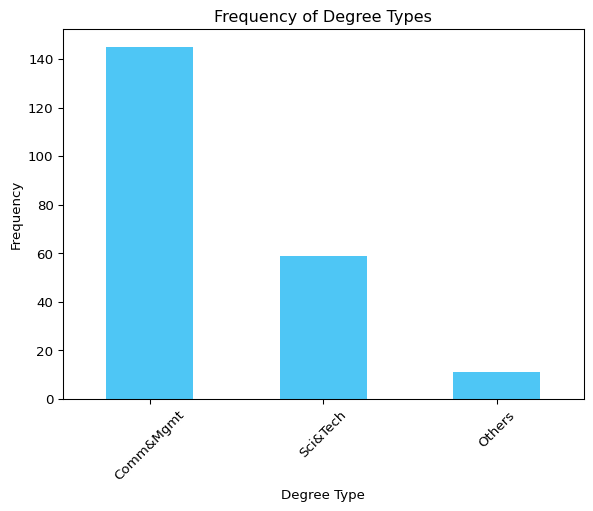
import matplotlib.pyplot as plt# Plot the frequency of the original datasetreal_data["degree_type"].value_counts().plot(kind="bar", color="#03AFF1", alpha=0.7)plt.title("Frequency of Degree Types")plt.xlabel("Degree Type")plt.ylabel("Frequency")plt.xticks(rotation=45)plt.show()
The bar chart shows the imbalanced distribution of the degree_type column, with some categories being significantly more frequent than others. This imbalance can lead to biased synthetic data generation if not addressed.
UniformEncoder
The UniformEncoder from the RDT library solves this problem by transforming categorical columns into a uniform numerical distribution. This ensures that the encoded values are evenly distributed, preserving the original data’s characteristics.
from rdt import HyperTransformerfrom rdt.transformers import UniformEncoder# Use HyperTransformer to detect and apply transformationstransformer = HyperTransformer()transformer.set_config( {"sdtypes": {"degree_type": "categorical"},"transformers": {"degree_type": UniformEncoder()}, })# Transform the datatransformed_data = transformer.fit_transform(real_data)transformed_data.head()
degree_type
0
0.222982
1
0.228482
2
0.625732
3
0.073374
4
0.327050
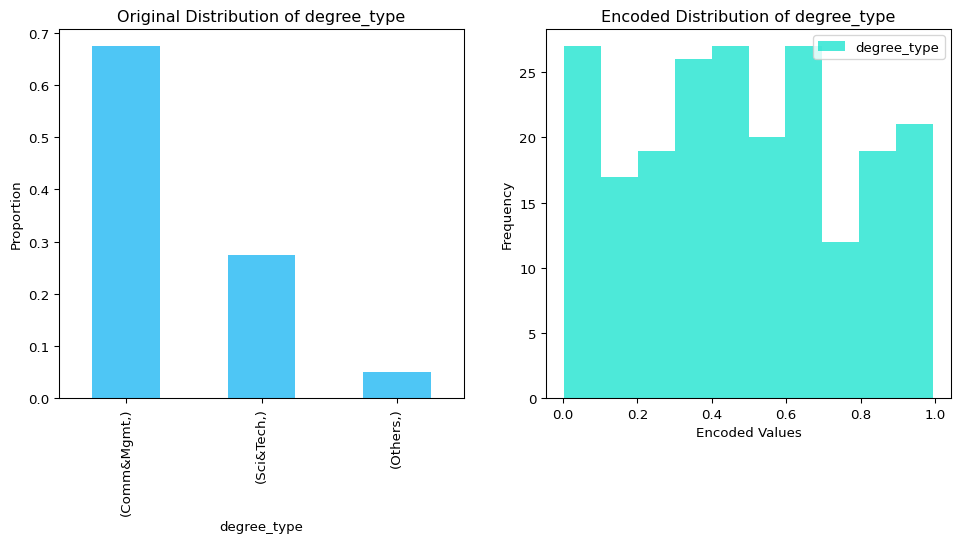
The UniformEncoder maps each category to a unique numerical value between 0 and 1, ensuring uniform distribution.
Let’s compare the encoded values with the original categorical data:
# Create a figure with two subplotsfig, (ax1, ax2) = plt.subplots(1, 2, figsize=(12, 5))# Plot the original distribution on the first subplotreal_data.value_counts(normalize=True).plot( kind="bar", color="#03AFF1", alpha=0.7, label="Original Data", ax=ax1)ax1.set_title("Original Distribution of degree_type")ax1.set_ylabel("Proportion")# Plot the encoded distribution on the second subplottransformed_data.plot( kind="hist", bins=10, color="#01E0C9", alpha=0.7, label="Encoded Data", ax=ax2)ax2.set_title("Encoded Distribution of degree_type")ax2.set_ylabel("Frequency")ax2.set_xlabel("Encoded Values")plt.show()
The first plot shows the imbalanced distribution of the original categorical data, while the second plot demonstrates how the UniformEncoder transforms the data into a uniform numerical distribution.
Next, we can use the transformed data for synthetic data generation.
from sdv.single_table import GaussianCopulaSynthesizer# Initialize and fit the synthesizersynthesizer = GaussianCopulaSynthesizer(metadata)synthesizer.fit(transformed_data)# Generate synthetic datasynthetic_data = synthesizer.sample(num_rows=100)# Reverse transform the synthetic datareversed_data = transformer.reverse_transform(synthetic_data)# Display the reversed columnreversed_data.head()
degree_type
0
Others
1
Sci&Tech
2
Comm&Mgmt
3
Sci&Tech
4
Comm&Mgmt
The reverse_transform method converts the numerical values back to their original categorical form, making the synthetic data interpretable.
Finally, we can evaluate the quality of the synthetic data.
from sdv.evaluation.single_table import get_column_plot# Visualize the distribution of the real and synthetic datafig = get_column_plot( real_data=real_data, synthetic_data=reversed_data, metadata=metadata, column_name="degree_type",)fig.show()
This plot compares the distribution of the degree_type column in the real and synthetic datasets, demonstrating how well the UniformEncoder preserves the original data’s characteristics.